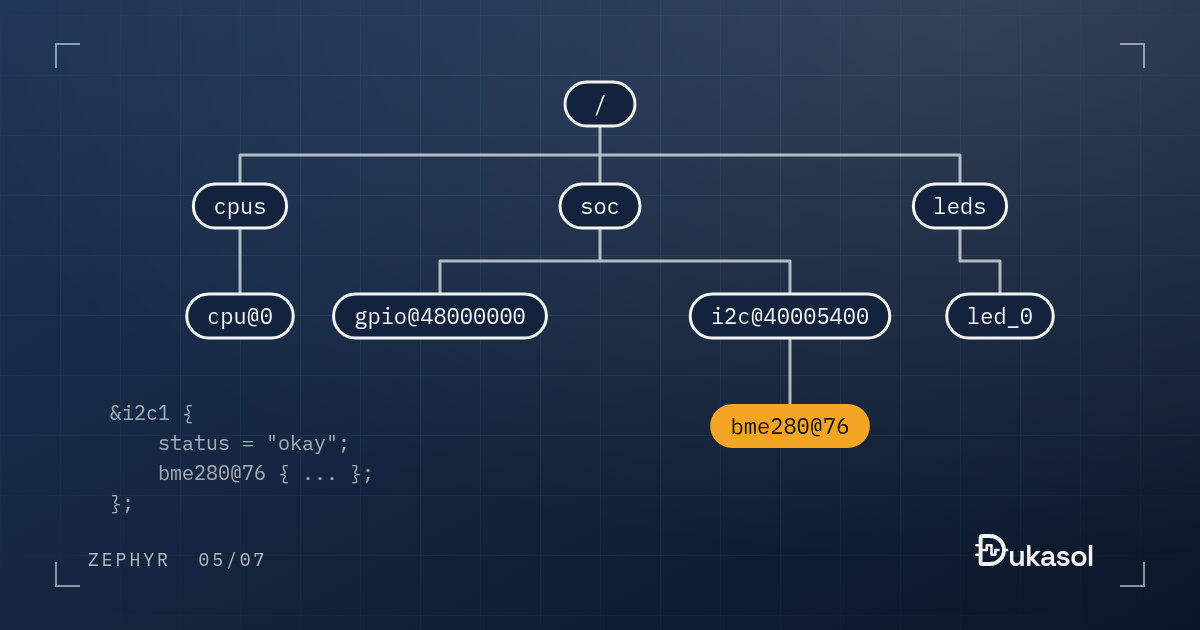
Device Tree is a hard concept to learn if you do not come from Linux; I was one of the people who struggled with it.
The simplest way to think of it is as a description of your hardware. You
create a .dts file for each PCB, and that file describes every electronic
component connected to the processor, in a hierarchy.
That sentence is true, but it is hard to act on. So this post follows one real example all the way through: adding a BME280 sensor to an STM32 Nucleo board, from the overlay you write to the machine code it ends up as. Everything below was built with Zephyr 4.4.2.
From board.h to a devicetree#
In bare metal, the description of the board lives in a header:
/* board.h */
#define LED_PORT     GPIOA
#define LED_PIN      5
#define SENSOR_I2C   I2C1
#define SENSOR_ADDR  0x77
It works, and it has three quiet problems. Nothing checks it: a typo in a pin
number compiles fine. Nothing except your code can read it, so the build
cannot tell which drivers the board needs. And it is tangled with code: the
moment one #ifdef BOARD_REV_B appears, the description of the hardware and
the logic of the firmware are the same file.
A devicetree holds the same facts as data, in a format that the build can read, check and turn into code.
Three layers: SoC, board, overlay#
A Zephyr devicetree is built from layers, each one owned by someone different:
- The SoC
.dtsidescribes the chip: every peripheral with its address, interrupts and clocks. Most of them are markedstatus = "disabled". The silicon vendor and the Zephyr maintainers own this file. - The board
.dtsincludes the SoC and describes the PCB: which peripherals are wired up and how, which pins they use, where the LEDs and buttons are, which UART is the console. Whoever designed the board owns it. - Overlays are your project’s changes on top: the sensor you added, the peripheral you need enabled, the pin you moved. You own those.
Here is the overlay that ships with Zephyr’s BME280 sample:
&arduino_i2c {
    status = "okay";

    bme280@77 {
        compatible = "bosch,bme280";
        reg = <0x77>;
    };
};
Notice what it does not say: it never names an STM32 I2C peripheral. It refers
to arduino_i2c, a label for the I2C bus on the Arduino header. The Nucleo
board’s connector file maps that label with one line:
arduino_i2c: &i2c1 {};
and the nRF52840 DK maps it to its own i2c0. So this overlay is not written
for the Nucleo at all. It is written for the header, and it builds unchanged
for both boards: on the Nucleo the build enables the STM32 I2C driver, on the
DK the Nordic one.
After the build, the merged result is in build/zephyr/zephyr.dts, and this is
the most useful file in the whole build directory. Every property carries a
comment saying which file and which line it came from. Here is the I2C node
on the Nucleo, trimmed and with the paths shortened:
i2c1: arduino_i2c: i2c@40005400 {
    compatible = "st,stm32-i2c-v1";              /* in zephyr/dts/arm/st/f4/stm32f4.dtsi:316 */
    reg = < 0x40005400 0x400 >;                  /* in zephyr/dts/arm/st/f4/stm32f4.dtsi:320 */
    interrupts = < 0x1f 0x0 >,
                 < 0x20 0x0 >;                   /* in zephyr/dts/arm/st/f4/stm32f4.dtsi:322 */
    pinctrl-0 = < &i2c1_scl_pb8 &i2c1_sda_pb9 >; /* in zephyr/boards/st/nucleo_f401re/nucleo_f401re.dts:107 */
    clock-frequency = < 0x61a80 >;               /* in zephyr/boards/st/nucleo_f401re/nucleo_f401re.dts:110 */
    status = "okay";                             /* in arduino_i2c.overlay:14 */

    /* node '/soc/i2c@40005400/bme280@77' defined in arduino_i2c.overlay:16 */
    bme280@77 {
        compatible = "bosch,bme280"; /* in arduino_i2c.overlay:17 */
        reg = < 0x77 >;              /* in arduino_i2c.overlay:18 */
    };
};
All three layers are visible in one node. The address, the interrupts and the
compatible come from the SoC file. The pins (PB8 and PB9) and the 400 kHz bus
speed come from the board. The status and the sensor itself come from the
overlay. When a build does something you did not expect, this file tells you
who said what.
Bindings: what makes a compatible mean something#
compatible = "bosch,bme280" is not a free-form comment. The build matches it
against a binding: a YAML file in dts/bindings that says which properties a
node of that kind may have, of which type, and which are required. The
BME280’s binding is short, because it inherits almost everything:
description: BME280 integrated environmental sensor

compatible: "bosch,bme280"

include: [sensor-device.yaml, i2c-device.yaml]
Bindings are what turn the devicetree from a description into a checked
description. The gpio-leds binding, for example, marks the gpios property
of each LED as required. Add an LED to an overlay without it, and the build
stops before a single C file is compiled:
devicetree error: 'gpios' is marked as required in 'properties:' in 'zephyr/dts/bindings/led/gpio-leds.yaml', but does not appear in <Node /leds/led_9 in bad-led.overlay:3>
It names the binding, the rule, and the exact line of your overlay. Compare
that with a typo in board.h.
You can write bindings for your own hardware too, and it is less work than it sounds. Here is one for a status LED with a configurable blink period:
description: |
  A status LED that blinks at a fixed period.

compatible: "fwnotes,status-led"

properties:
  gpios:
    type: phandle-array
    required: true
    description: The GPIO that drives the LED.

  blink-period-ms:
    type: int
    default: 500
    description: Full on-off period, in milliseconds.
A board overlay then describes the actual hardware, in this case LD2 on the Nucleo:
/ {
    status_led: status-led {
        compatible = "fwnotes,status-led";
        gpios = <&gpioa 5 GPIO_ACTIVE_HIGH>;
        blink-period-ms = <1000>;
    };
};
and the code reads it through the DT_ macros:
#define STATUS_LED DT_NODELABEL(status_led)
#define PERIOD_MS  DT_PROP(STATUS_LED, blink_period_ms)

static const struct gpio_dt_spec led = GPIO_DT_SPEC_GET(STATUS_LED, gpios);
Two practical details. A binding lives in a dts/bindings directory of your
application or module, and the build finds it there on its own. And an
out-of-tree vendor prefix like fwnotes gets a warning (has unknown vendor
prefix) until you list it in a vendor-prefixes.txt next to your bindings.
The complete example, with an overlay for native_sim and one for the Nucleo,
is in device-tree in firmware-notes,
and CI runs it on every push.
So how does it work?#
During the build, CMake (which west build drives) collects the board’s
.dts and your overlays and runs them through the C preprocessor. That is why
a devicetree can use #include and macros like GPIO_ACTIVE_HIGH. The result
then goes to Zephyr’s devicetree scripts. gen_edt.py parses it and checks
every node against its binding. A Python script called gen_defines.py writes
a header file called devicetree_generated.h. The DT_ macros in that header
give the C code the hardware’s details at compile time.
For the sensor in the overlay, the header ends up with 86 macros. A few of them:
#define DT_N_S_soc_S_i2c_40005400_S_bme280_77_PATH "/soc/i2c@40005400/bme280@77"
#define DT_N_S_soc_S_i2c_40005400_S_bme280_77_P_compatible {"bosch,bme280"}
#define DT_N_S_soc_S_i2c_40005400_S_bme280_77_P_reg {119 /* 0x77 */}
You never write these names yourself; DT_NODELABEL(), DT_PROP() and their
relatives build them for you. But when a DT_ macro fails to compile, grepping
this header for your node is the fastest way to see what the build actually
generated.
The devicetree also feeds Kconfig: the compatible of every enabled node
produces a DT_HAS_<compat>_ENABLED symbol, and that is how the right drivers
get switched on and compiled. The BME280 driver’s Kconfig shows how far this
goes:
menuconfig BME280
    bool "BME280/BMP280 sensor"
    default y
    depends on DT_HAS_BOSCH_BME280_ENABLED
    select I2C if $(dt_compat_on_bus,$(DT_COMPAT_BOSCH_BME280),i2c)
    select SPI if $(dt_compat_on_bus,$(DT_COMPAT_BOSCH_BME280),spi)
The driver turns itself on when a BME280 exists in the devicetree, and it turns
on the I2C subsystem only if that BME280 sits on an I2C bus. The sample’s
prj.conf contains two lines, CONFIG_SENSOR=y and CONFIG_SENSOR_ASYNC_API=y.
It never mentions the BME280 or I2C, and both end up enabled, because the
devicetree says there is a BME280 on an I2C bus.
All of it at compile time#
All of this happens at compile time. There is no runtime cost at all.
That is easy to say, so here is what it looks like. This is the main() of
the status LED example above, built for the Nucleo, disassembled and trimmed:
 8000492:   mov.w   r3, #1000   @ 0x3e8
 8000496:   movs    r2, #5
 8000498:   bl  8002b7c <printk>
 ...
 800049e:   movs    r1, #32
 ...
 80004ae:   movw    r0, #5000   @ 0x1388
 80004b2:   movs    r1, #0
 80004b4:   bl  80034ee <z_impl_k_sleep>
#1000 is the blink period from the overlay. #5 is the pin, PA5, and #32
is its bit mask, 1 << 5. #5000 is PERIOD_MS / 2, half a second, already
converted to kernel ticks at this board’s 10,000 ticks per second. The
devicetree did not survive into the binary as data. It became immediate
operands in the instructions, exactly as if you had typed the numbers by hand,
except that the build checked them first.
On Linux the same mechanism works differently: the .dts is compiled into a
binary blob and the kernel reads it at runtime. Zephyr deliberately moved this
to compile time, because the microcontrollers it targets have neither the
memory nor the processing power to spare for it at runtime.
Why it is worth the effort#
Coming from bare metal, this looks like unnecessary complexity at first. But you
can build the same application code for a different PCB just by changing an
.overlay file. The application code never knows the hardware; it only sees
the abstraction that comes out of the Device Tree.
That pays off in places a demo never shows. A board revision that moves the
sensor to another I2C bus is a one-line change in an overlay. A second product
variant with a different sensor is a second overlay, not an #ifdef. And
because connectors like the Arduino header have their own labels, an add-on
board can be described once and used on every base board that has the header.
Three habits that save time#
- Read
build/zephyr/zephyr.dtsafter every surprising build. It is the final devicetree, and every property says where it came from. - Grep
devicetree_generated.hwhen aDT_macro does not compile. The error almost always means the node or the property does not exist the way you think, and the header shows what does. - Pick the right way to refer to a node. Use node labels
(
DT_NODELABEL) for your own hardware, aliases (DT_ALIAS, likeled0) for things every board is expected to provide, and thechosennode (DT_CHOSEN) for system roles such as the console.
Devicetree error messages deserve a post of their own, and they will get one later in this series.
I recommend looking at the blinky sample in the official Zephyr repository. For the whole topic, the Device Tree documentation is a good place to start. The next post in this series covers the other half of the configuration: Kconfig.